Games that set up the match later
By default the new host restores the saved state as soon as the map has loaded its actors. Some games set up the match after that: they load game mode data, game features or components asynchronously, and only then spawn pawns and add the components that hold the score. Lyra's experiences are an example. Restoring before that is too early: the state lands on objects that are not there yet, and the game then starts the match from scratch.
Wait For Game Ready
Turn on Wait For Game Ready and call Notify Game Ready on the subsystem when your game has set up the match.
- The new host loads the map and waits. The overlay keeps showing, and the host is not announced yet.
- Your game sets up the match as usual, including spawning the players' pawns.
- You call Notify Game Ready. The plugin restores the actors, GameMode, GameState and players, announces the host and starts the grace period.
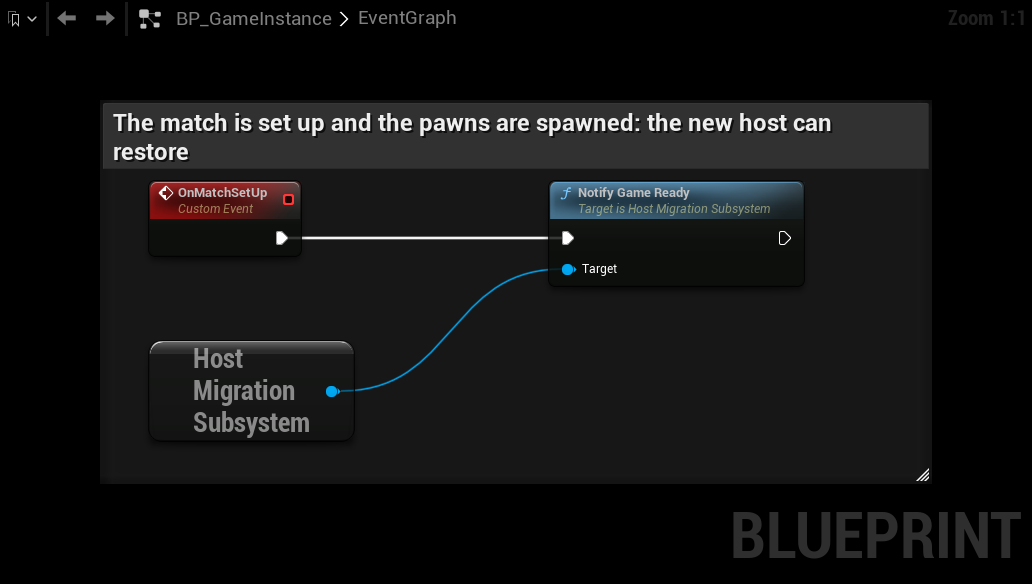
If Notify Game Ready is not called within Game Ready Timeout (default 30 s), the plugin restores anyway.
[/Script/HostMigrationCore.HostMigrationSettings]
bWaitForGameReady=true
GameReadyTimeout=30.0
Call Notify Game Ready on every match start, not only after a migration. Outside a migration it does nothing.
Pawns the game spawned
When the game has already spawned a pawn for a player and that player's saved pawn is of the same class, the plugin uses the game's pawn: it moves it to the saved position and loads the saved state into it. Everything the game set up on the pawn stays. If the classes differ, the saved pawn is spawned and possessed, and the game's pawn is destroyed.
Actors the game spawns at runtime
Actors with a Host Migration Id that your game spawns at runtime (in BeginPlay, from a spawner, in the GameMode) are spawned again by the game on the new host. They are also in the snapshot, so without cleanup they would exist twice.
With Destroy Unsaved Runtime Actors (on by default), the new host destroys the runtime actors it spawned itself that are not in the snapshot. This happens after BeginPlay, or after Notify Game Ready with Wait For Game Ready. The log says Destroying ...: spawned by the game on the new host but not in the snapshot.
- Controllers, PlayerStates, the GameState, the GameMode and players' pawns are never destroyed.
- Add classes to Keep Unsaved Runtime Actor Classes to keep their actors.
[/Script/HostMigrationCore.HostMigrationSettings]
bDestroyUnsavedRuntimeActors=true
+KeepUnsavedRuntimeActorClasses=/Game/Blueprints/BP_Spawner.BP_Spawner_C
Returning players
A player who comes back later (after a migration, or after stepping away) logs in before the game has spawned a pawn for them. By default the plugin gives them their saved pawn right away. For games that set up their pawns themselves, turn on Restore Into Game Pawn: the plugin waits for the pawn the game spawns for the player, moves it to the saved position and loads the saved pawn's state into it. The saved pawn is removed. If the classes differ, the game's pawn is kept and the saved one stays in the world.
[/Script/HostMigrationCore.HostMigrationSettings]
bWaitForGameReady=true
bRestoreIntoGamePawn=true
Is Restore Pending
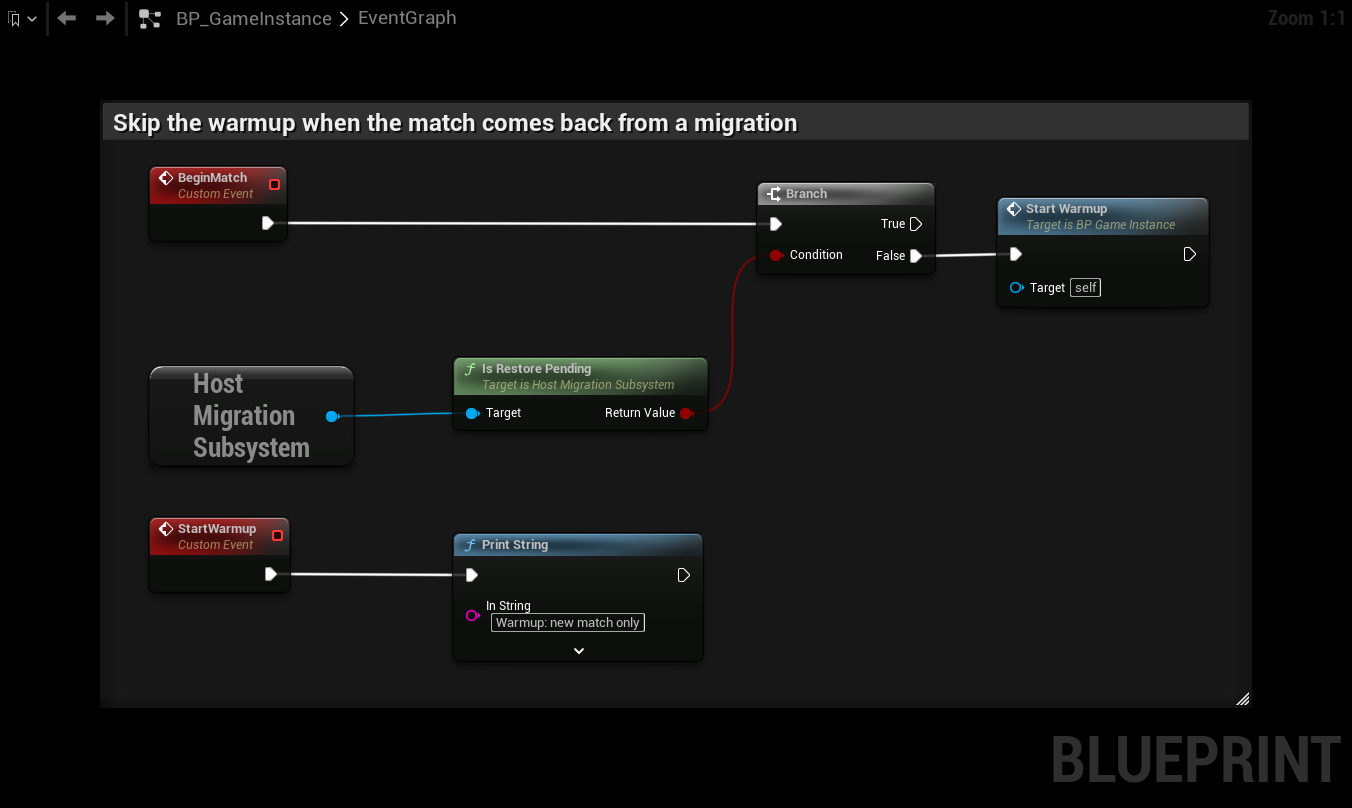
Is Restore Pending is true on the new host from the map load until the restore. Use it to skip things that should only happen in a new match, such as a warmup phase or a match timer reset.
Example: Lyra
Lyra loads its experience after the map, so the new host has to wait for it.
The Lyra setup video shows these steps.
- Turn on Wait For Game Ready and Restore Into Game Pawn in
Config/DefaultGame.ini:
[/Script/HostMigrationCore.HostMigrationSettings]
bWaitForGameReady=true
bRestoreIntoGamePawn=true
- Add
HostMigrationCoreto the dependencies inSource/LyraGame/LyraGame.Build.cs:
PrivateDependencyModuleNames.AddRange(
	new string[] {
		"HostMigrationCore",
		"InputCore",
- In
Source/LyraGame/GameModes/LyraGameMode.cpp, include the subsystem:
#include "HostMigrationSubsystem.h"
- In
ALyraGameMode::InitGameState, call Notify Game Ready once the experience has loaded. Register it with low priority, after the existingCallOrRegister_OnExperienceLoadedline, so the game mode has spawned the pawns first:
ExperienceComponent->CallOrRegister_OnExperienceLoaded_LowPriority(FOnLyraExperienceLoaded::FDelegate::CreateWeakLambda(this, [this](const ULyraExperienceDefinition*)
{
	if (UHostMigrationSubsystem* Migration = GetGameInstance() ? GetGameInstance()->GetSubsystem<UHostMigrationSubsystem>() : nullptr)
	{
		Migration->NotifyGameReady();
	}
}));
- Build the project.
Lyra's CommonSessionSubsystem also joins sessions through a reservation beacon on the host. The new host has no
beacon, so players who come back or join late cannot join it. Turn the beacons off in Config/DefaultEngine.ini, and
in any platform config that sets them again (for example Config/Custom/Steam/DefaultEngine.ini):
[/Script/CommonUser.CommonSessionSubsystem]
bUseBeacons=false
Lyra keeps its match state (scores, stats, teams, the match timer) in properties without SaveGame. See Tutorial: Lyra Sample Project for how to carry it over with Blueprint.